M3XI Get CallMe

Safety on CallMe

Safety, built in.

CallMe puts you on live calls with people you have not met, so safety is part of every call rather than a page of settings. Everyone is a verified adult, every call opens on voice, and reporting or blocking someone takes you straight out of the call. A person on our safety team acts on every report within 24 hours.

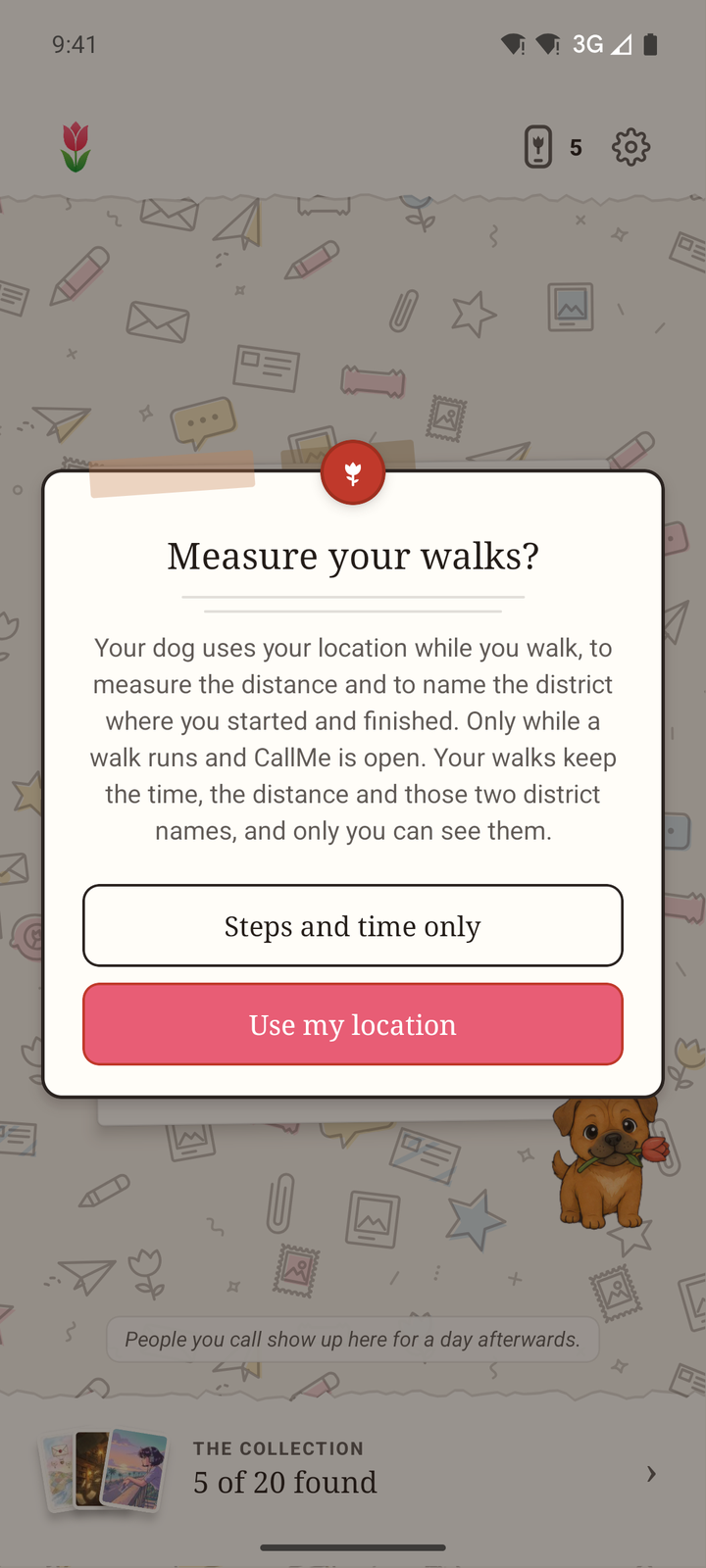
CallMe asking before it uses location for a walk, with a choice of steps and time only
CallMe asks before it uses your location, as it does when a walk starts.

Who you will meet

Everyone is 18+ and verified.

CallMe is for adults aged 18 and over, and the age check is not a box to tick. Nobody can match or call anyone until they have passed it.

  • An ID check, not a date of birth

    Everyone verifies their age before they can call anyone, with an identity document, a live selfie and a face match. The check is carried out by our verification provider, Didit.

  • No way round it

    There is no way to skip verification and reach the calling features, and anyone whose document shows they are under 18 cannot complete it. Matching never goes below 18, however long you wait.

  • Your documents are not sent to us

    Your document images and selfie go directly to Didit and are never stored on our servers. We receive the result: pass or fail, your date of birth and your age.

Verification proves someone is a real adult. It is not a background check, so never share financial details or your home address.

On a call

Voice first. Video only when you both agree.

Nobody sees you just because a call has connected.

  • One-to-one calls open on voice

    On a one-to-one call, video turns on only when both of you ask for it. Until then, it is a voice call. At a table, the host sets the camera rule: voice only, up to each person, or cameras on.

  • Nobody else can switch on your camera

    One person can never switch on the other person's camera. Our servers check that both of you asked, every time.

  • Your camera stays yours

    You can turn your camera off at any time without ending the call. Your phone number and email are never shown to anyone you talk to.

Pressuring someone to turn on video breaks the CallMe terms.

Something wrong?

Get out first. We deal with the rest.

Tap the shield in the top corner of a call. When you report or block someone, the app mutes your microphone and takes you out of the call without waiting for the report to send, so a bad connection can never keep you there. If sending fails, the app tries again later.

Behind the shield

  • Silence someone, just for you They stay on the call and never know. You stay on it too, and you can undo it at any time.
  • Someone sounds underage This has its own option, so it is never buried in a list of reasons. You leave the call, and your report goes to the front of our review queue straight away.
  • Report someone Pick what happened: sexual content or exposure, threats or danger, harassment or bullying, hate or abuse, scam or spam, or something else. You leave the call, and you will not be matched with them again.
  • Not sure who? Flag the call Nobody gets singled out. Our team looks at the whole call.
  • Block someone You leave the call, and neither of you can be matched with the other again or join a room or call the other is in. Any friendship between you ends. On a group call, the people who came with them are blocked too. You can unblock someone later in Settings.
  • Leave straight away Press and hold the shield to leave the call at once, with nothing to choose and nothing to confirm.
  • After a call

    The call summary has a link, Something wasn’t right on this call, that opens the same options. There you can also choose not to be matched with someone again, without reporting them, and change your mind later in Settings.

  • At a table

    When you are sitting with a few people, you can silence someone, block someone, or flag the whole table so our team looks at it.

  • In a chat

    Press and hold a message to report it, or block the person who sent it. A report keeps a copy of the message, so deleting it afterwards does not hide it from us.

  • Posters, snapshots and profiles

    Every poster, snapshot, card design and profile can be reported from where you see it, and you can block the person behind it from the same place.

  • Hide it from your feed

    Hide a post and it leaves your feed straight away. You do not have to report it first, and you can still report it if it breaks the rules.

  • Your lists, in Settings

    Settings shows who you have blocked, who you have chosen not to be matched with, and your reports.

What we do with reports

What happens after a report.

You will not be matched with the person again, and that part happens straight away. Within 24 hours, a person decides the rest.

  • A person reviews it within 24 hours

    A person on our safety team reviews every report within 24 hours. If it broke the rules, we remove what was posted and remove the account that posted it from CallMe.

    You get a reference, and you can see it and where it has got to in Settings, under Your reports.

  • Serious reports come first

    A report that someone sounds underage, of sexual content, or of threats can pause the other account while we check. An account reported as underage can be kept out of calls until it passes a fresh ID check.

  • Nobody is told who reported them

    A report never tells the other person who filed it. It does not tell you what happened to their account either.

  • Repeated reports add up

    Reports from separate calls lead to a warning, then to a suspension, and the suspensions grow longer if it keeps happening.

  • We can go further

    We may warn, suspend or permanently ban an account, remove content, or refer a matter to the police. We may act on a single serious report without warning.

  • The record stays

    Reports, and the decisions made on them, are kept after an account closes, so deleting an account does not wipe the record of what someone did.

Friends, snapshots and walks

Only friends, only if you say so.

The friends map, snapshots and dog walks are new in CallMe. Each one is off, or private to you, until you choose otherwise.

  • The map is off until you choose

    Location sharing starts off. Once you turn it on, nobody you haven't added as a friend can see where you are, and with Choose friends, only the ones you tick. It starts at your town, never your door, and you can switch to precise in Settings, under Location.

  • Only while CallMe is open, for a day

    Your phone sends your place only while the app is open, never in the background. Sharing switches itself off 24 hours after you turn it on, so it is only ever on because you turned it on in the last 24 hours. You can turn it off sooner in Settings, under Location.

  • Snapshots are checked first

    A snapshot is a photo for your friends that lasts 24 hours. Every one is checked before your friends see it, you can delete yours at any time, and any snapshot can be reported.

  • Your walks are yours

    A walk measures distance and pace while CallMe is open, and keeps only the name of the district it started and ended in, never a street. Your walks and bests are private, and each one can be deleted. While a walk is running, and only if you have turned on Show friends what I’m up to, your friends can see that you are out walking.

The CallMe dog, nose to the ground, sniffing
Only friends can sniff you out.

The rules

What nobody may do on CallMe.

CallMe has zero tolerance for objectionable content and for abusive users. These rules are part of the CallMe terms, which everyone agrees to in the app before they start. On a call, or anywhere in the app, you must not:

  • post, show or send sexual content or nudity, or expose yourself;
  • harass, bully, threaten, degrade or sexually harass anyone;
  • post hateful content or slurs, or attack anyone for who they are;
  • threaten or encourage violence, or show violent content;
  • bring anyone under 18 onto a call or into the app, or post anything that sexualises, exploits or endangers a child;
  • scam anyone, or ask for money, gifts, investments or personal financial details;
  • record, screenshot or share a call or another person's images without their consent;
  • misrepresent your age or identity, or use another person's identity document;
  • promote, arrange or facilitate anything illegal;
  • pressure someone to turn on video;
  • contact someone who has blocked you, or create a new account to get round a block or ban.

The full wording is in the CallMe terms.

The small print

Your data, children, and leaving.

  • Your data

    CallMe does not record the audio or video of your calls, never turns what is said into text, and nothing listens in.

    What you write for other people is checked against CallMe's own lists of words and patterns, and no AI reads it. When video is on, still frames are checked for nudity.

    What we do collect, why, and how long it is kept is set out in the CallMe privacy policy.

  • Children

    CallMe is strictly for adults. If we learn that an account belongs to someone under 18, we close it and delete its data.

    Our child safety standards explain how we keep under-18s out, and how anyone can report a concern.

  • Deleting your account

    In the app, go to Settings, then Delete account and data.

    If you no longer have the app, m3xi.com/delete-account explains how to ask us, and what we keep.

Getting help

Talk to a person.

Report someone or somethingsafety@m3xi.com
Help with CallMesupport@m3xi.com
A child safety concernsupport@m3xi.com

You do not need to use CallMe to report a concern to us. A person reads every email, and a report sent to safety@m3xi.com is reviewed within 24 hours, like a report made in the app. If anyone is in immediate danger, contact your local emergency services first.